Apple Watch heart rate zones explained by age
How Apple Watch sets its five heart rate zones, a moderate heart rate range for your age, and how to fix zones that look wrong.
By Tom Bettesworth, co-founder of VitaOS · Published 27 October 2026
The short answer: Apple Watch splits your workout heart rate into five zones, each a percentage of your maximum heart rate, worked out from your health data and your date of birth, according to Apple. The British Heart Foundation puts moderate exercise at 50 to 70% of your maximum: about 85 to 120 bpm at 50 and about 80 to 115 bpm at 65. If the zones look wrong for you, you can set them yourself.
How does Apple Watch work out your heart rate zones?
Apple says the zones are a percentage of your maximum heart rate, calculated automatically and personalised using your health data, and shown in five segments. They are only calculated if you have entered your date of birth in the Health app on your iPhone (Apple Support). Apple does not publish the exact formula.
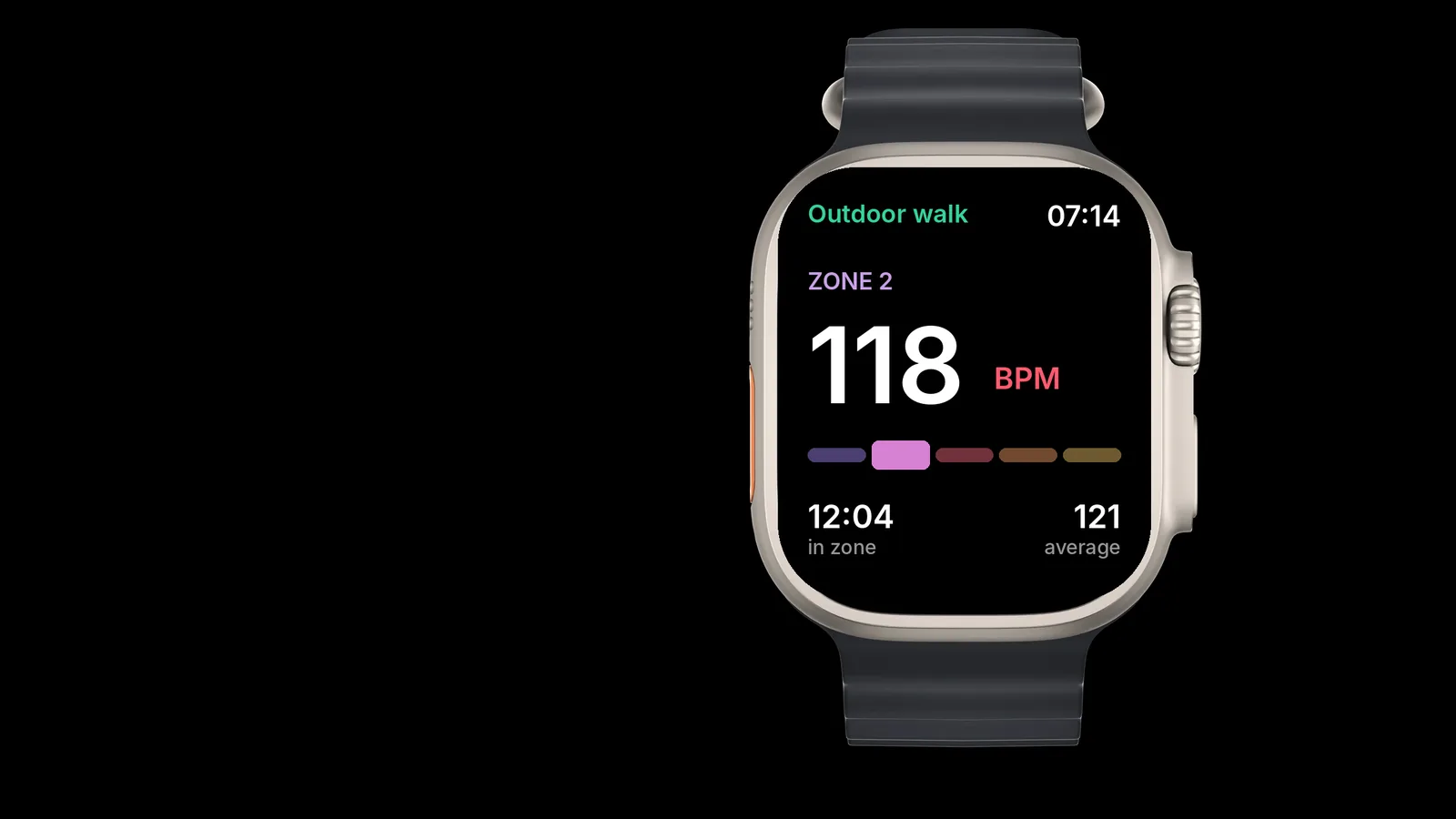
To see them, start a cardio workout such as an Outdoor Walk or Outdoor Run in the Workout app and turn the Digital Crown to the Heart Rate Zone view. It shows your current zone, your heart rate, the time spent in that zone and your average heart rate.
What are the heart rate zones for my age?
Your maximum heart rate falls by about 7 beats per minute every ten years, so every zone moves down with age. The most widely used peer-reviewed formula, 208 minus 0.7 times your age, comes from a meta-analysis of 351 studies and 18,712 people (Tanaka and colleagues, 2001), and it did not differ between men and women. The moderate range below is the BHF's 50 to 70% of that maximum.
| Age | Maximum heart rate (208 minus 0.7 x age) | Maximum heart rate (220 minus age) | Moderate range, 50 to 70% |
|---|---|---|---|
| 40 | 180 bpm | 180 bpm | 90 to 126 bpm |
| 45 | 176 bpm | 175 bpm | 88 to 124 bpm |
| 50 | 173 bpm | 170 bpm | 86 to 121 bpm |
| 55 | 170 bpm | 165 bpm | 85 to 119 bpm |
| 60 | 166 bpm | 160 bpm | 83 to 116 bpm |
| 65 | 162 bpm | 155 bpm | 81 to 114 bpm |
| 70 | 159 bpm | 150 bpm | 80 to 111 bpm |
The older 220 minus age formula, which the BHF uses, gives a lower maximum after 40, and Tanaka and colleagues found it underestimates maximum heart rate in older adults. Both formulas describe the average person. Your own maximum can be higher or lower, which is why a zone can feel too easy or too hard.
What heart rate zone should I be in?
For most of your exercise, aim for moderate intensity: 50 to 70% of your maximum heart rate, says the BHF, or the point where you can still talk but not sing, says the NHS. The NHS advises at least 150 minutes of moderate activity a week, or 75 minutes of vigorous activity, spread over 4 to 5 days or every day.
Which Apple Watch zone that is depends on your settings. Read the bpm limits of each zone (see below) and compare them with the moderate range for your age in the table. The BHF's talk test is a good check on the day: if you can talk comfortably, feel warm and are breathing a little more heavily than normal, you are at the right pace. Strength work counts separately; the NHS also advises strengthening activities on at least 2 days a week (see strength training after 40).
How long can you stay in zone 3?
There is no official limit on time in any one zone. UK guidance counts minutes a week instead: 150 minutes of moderate or 75 minutes of vigorous activity, or a mix of both. If zone 3 on your watch sits inside the moderate range for your age, a long walk or ride there counts towards the 150 minutes; if it sits above it, count those minutes as vigorous.
If you have not exercised for some time, or have a medical condition, the NHS advises speaking to your GP first. If you have heart or circulatory disease, the BHF advises checking with your doctor or nurse what heart rate to aim for.
Is 20 minutes in zone 5 bad?
Usually not, if you are healthy and used to hard exercise. Zone 5 is close to your maximum, and the NHS says short sessions of very vigorous activity, such as interval running or hill sprints, count towards your weekly target. Twenty minutes sits well inside the 75 minutes of vigorous activity a week the NHS sets out.
Two checks are worth making. A long stretch in zone 5 on an easy walk usually means the zones do not fit you, not that you were working flat out (see the next section). And the BHF notes that at maximum intensity you can run out of energy quickly, which is why it suggests most people exercise at moderate intensity.
Why are my Apple Watch heart rate zones wrong?
Usually because the zones rest on an estimate of your maximum heart rate, and yours is not the estimate. Any age formula describes the average person: if your real maximum is higher, ordinary efforts land in zones 4 and 5 and feel too easy for the label; if it is lower, hard efforts read as zone 2 or 3.
Other causes to check: a missing or wrong date of birth in the Health app, which Apple needs to calculate the zones; medicines such as beta blockers, which slow the heart; and a loose strap or sweaty skin, which the BHF says can stop a tracker reading your heart rate properly. If a reading worries you, the BHF suggests checking your pulse by hand.
How do you change heart rate zones on Apple Watch?
On the watch, open Settings, then Workout, then Heart Rate Zones, tap Manual, then tap zone 2, 3 or 4 and enter its lower and upper limits. On your iPhone, open the Apple Watch app, tap My Watch, then Workout, Heart Rate Zones and Manual (Apple Support). Zone 1 sits below zone 2 and zone 5 above zone 4.
If you know your real maximum heart rate from a supervised exercise test, set the zones from it. If not, check the limits against the moderate range for your age in the table above, then use the talk test on your next brisk walk to see whether the zone you land in matches how it feels.
Are Apple Watch heart rate zones accurate?
The heart rate behind them is one of the better wrist readings available. In a 2017 study of 50 adults on a treadmill, exercise bike and elliptical trainer, Apple Watch agreed closely with an ECG (a concordance of 0.92, where 1 is perfect), second only to a chest strap at 0.996. A 2017 study of seven wrist devices in 60 adults found Apple Watch had the lowest overall heart rate error.
Accuracy drops with some movements: no wrist device was accurate on an elliptical trainer using the arm levers, and errors were highest when walking. Both studies used early watch models. So the reading is usually trustworthy during steady exercise; whether the zone limits fit you is the bigger question.
When should you see a GP about your heart rate during exercise?
See your doctor if you get dizziness, palpitations or chest pain when exercising, or if you are worried about how fast or slow your heart is beating, the BHF advises. If you have a heart condition, ask your doctor or nurse what heart rate to aim for before you train by the watch's zones.
A high heart rate on its own during hard exercise is expected. A rise in your heart rate at rest that lasts for weeks is a different signal; see Apple Watch resting heart rate by age.
How VitaOS uses your heart rate zones
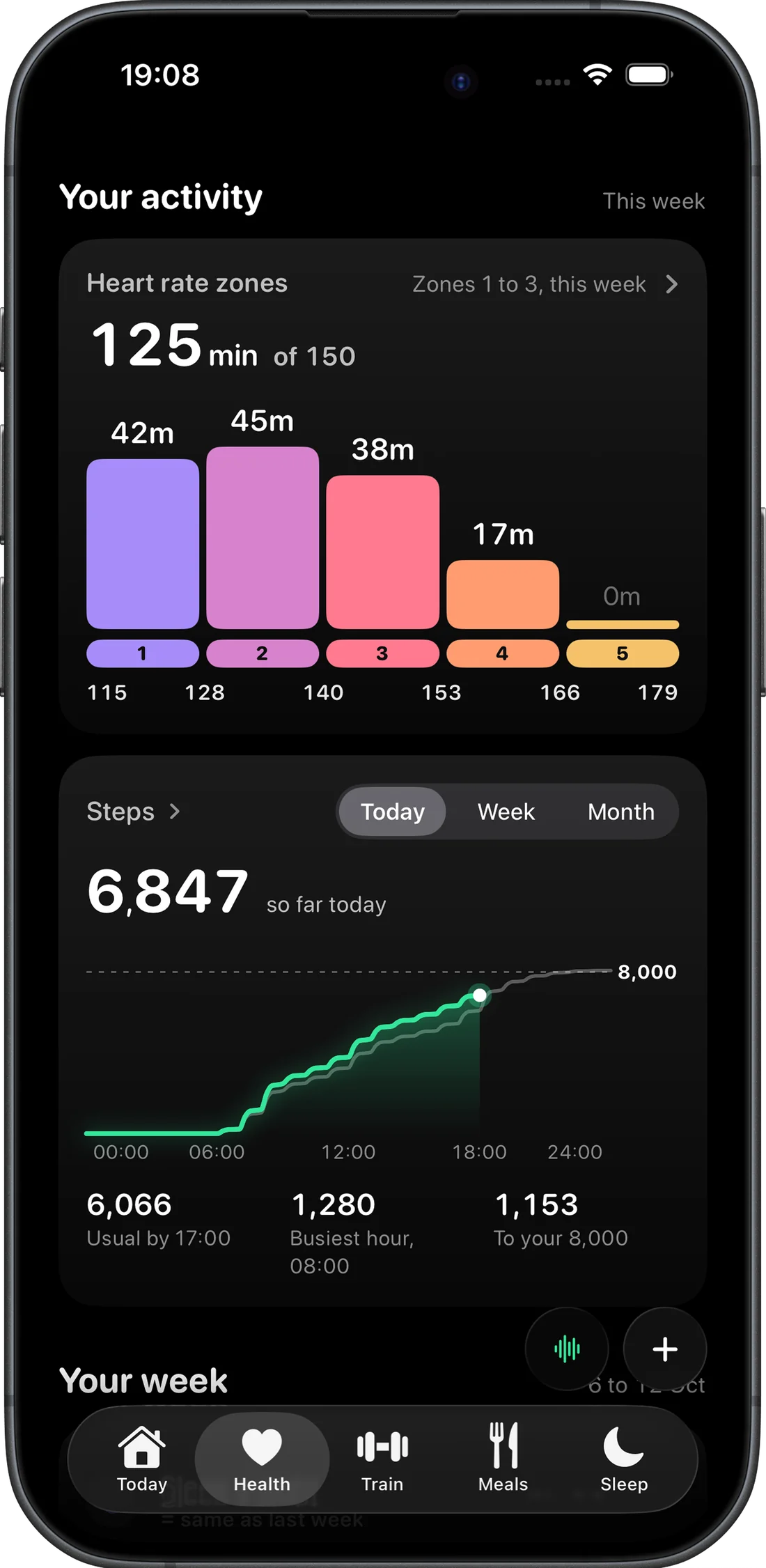
VitaOS sets your zones from your own heart rate data rather than an age chart, and counts every minute in each zone against a weekly target. The screen above shows 125 of 150 minutes in zones 1 to 3 this week, with each zone's bpm limits underneath.
It reads the same Apple Watch data overnight, so your training can follow your recovery: see Apple Watch HRV by age, resting heart rate by age and VO2 max by age. See how VitaOS sets your training, or how it reads your recovery.
Sources
Apple. View Heart Rate Zones on Apple Watch. Apple Watch User Guide.
Tanaka, H., Monahan, K. D., & Seals, D. R. (2001). Age-predicted maximal heart rate revisited. Journal of the American College of Cardiology, 37(1), 153 to 156.
British Heart Foundation. What should my heart rate be when I exercise? Published June 2025. And Heart rate: what's normal and how to check it.
NHS. Physical activity guidelines for adults aged 19 to 64 and for older adults.
Gillinov, S., Etiwy, M., Wang, R., and colleagues (2017). Variable accuracy of wearable heart rate monitors during aerobic exercise. Medicine and Science in Sports and Exercise, 49(8), 1697 to 1703.
Shcherbina, A., Mattsson, C. M., Waggott, D., and colleagues (2017). Accuracy in wrist-worn, sensor-based measurements of heart rate and energy expenditure in a diverse cohort. Journal of Personalized Medicine, 7(2), 3.